 VVA
Keep it at hand
Troubleshooting and reset
The most common situations, the message you see, and what to do.
The tablet
Start-up, sound, voice and parent code.
Byovva does not finish starting up
If a crossed-out cloud is shown with a round button, touch that button to try again. If the orca keeps spinning for a long time, press the power button and touch Restart.
The tablet makes no sound
Check the Sounds and narration icon in the bottom bar, then the volume with the tablet's buttons. In Settings, tab Audio, the Byovva volume must be above 0%.
Byovva does not respond to voice
The assistant must be turned on (Settings, Display and wallpaper, Call Byovva) and the tablet must be set to French. Say “Byovva”, wait for Yes?, then speak. If needed, adjust the microphone in Call settings.
Too many attempts. Parent access is temporarily locked.
The parent PIN was entered incorrectly several times. Wait until the lock ends, from a few seconds to an hour depending on the number of errors, then try again.
A technical menu has opened, sometimes in Chinese
Don't choose anything in it. Hold the power button for 12 to 15 seconds: the tablet restarts normally.
Wi-Fi
The messages of the Wi-Fi card, in Settings.
No Wi-Fi network visible at the moment.
Move the tablet closer to the Internet router, check that Wi-Fi is on, then touch Search for networks.
Wi-Fi search needs the nearby devices permission.
Accept the permission requested by the tablet, then search again.
The network connection could not be confirmed.
Check the network name and the password, including capital letters, then try again.
This QR code does not contain a valid Wi-Fi configuration.
The scanned QR code is not the Wi-Fi one. Look for the Wi-Fi QR code on the router's label, or type the password by hand.
This type of security is not supported by this scanner.
Your network uses a security type the scanner cannot read. Connect by typing the password by hand.
Byovva Connect
Messages from the parents' app have their own page.
Reset
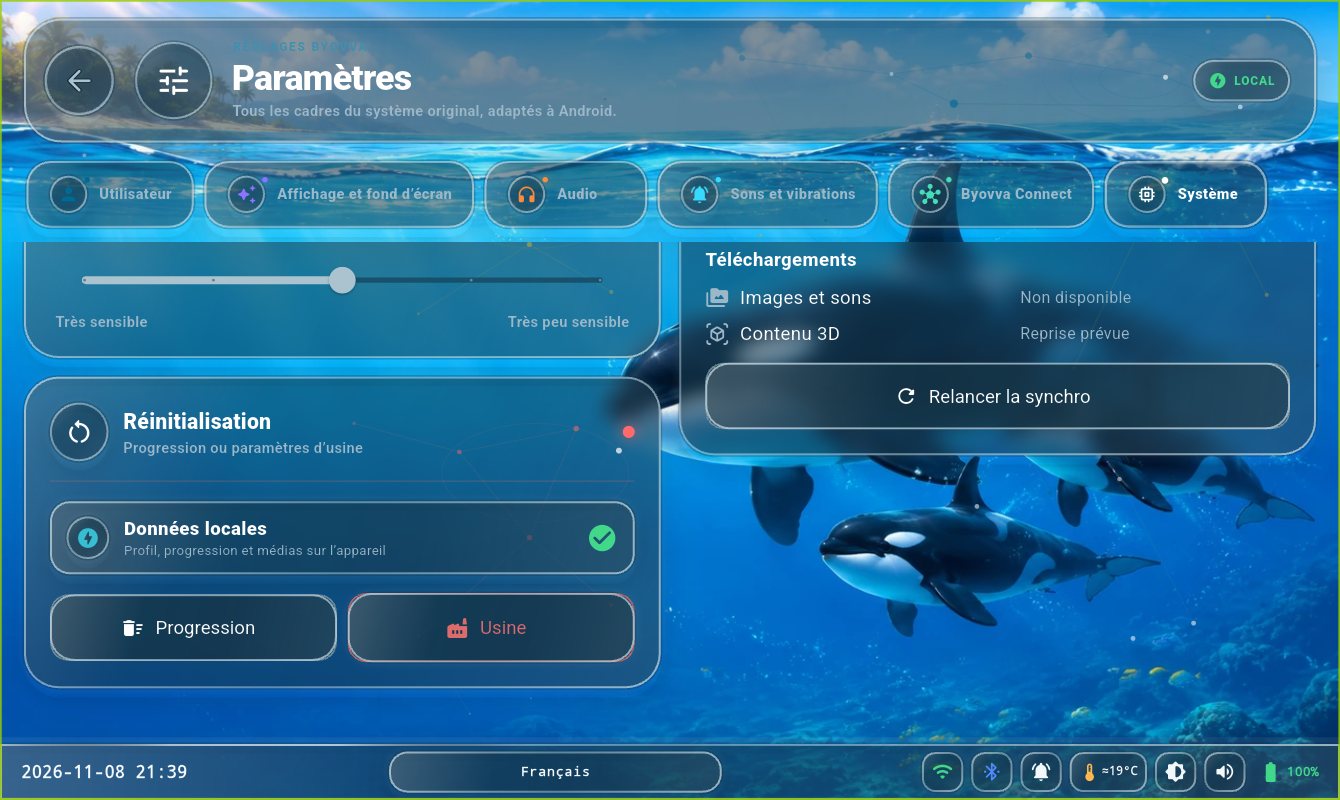
There are two kinds of reset, in Settings, tab System, card Reset.
| Button | What is erased | What remains |
|---|---|---|
| Progress | Mastery, XP points, recent activities, usage time, lessons and paths in progress. | The child's profile and all settings. |
| Factory | Profile, settings, progress, game saves, conversations, contacts, parent PIN. And, if the box stays ticked, the photos and music creations made with Byovva. | All activities and their images, sounds and videos, Wi-Fi, and the two included languages. |
“Factory” reset
- Touch Factory. The tablet asks Start again from scratch with Byovva?
- Leave ticked or untick the box that also erases the photos and the music studio creations.
- Touch Reset. During the operation, the screen shows Byovva is preparing your fresh start…
- Setup starts again: follow the first start-upagain. The two included languages are already chosen.
What is erased cannot be recovered. After a “Factory” reset, you also need to link Byovva Connect again, and create a new parent PIN.
If the message Byovva could not erase everything. appears, start the reset again to finish it.
the reset does not ask for the parent PIN in version 0.1.37: a child can start it alone.
Your problem is not on the list?
The Byovva team will answer you and guide you step by step.